Birda Photo ID (AI Bird Identification)
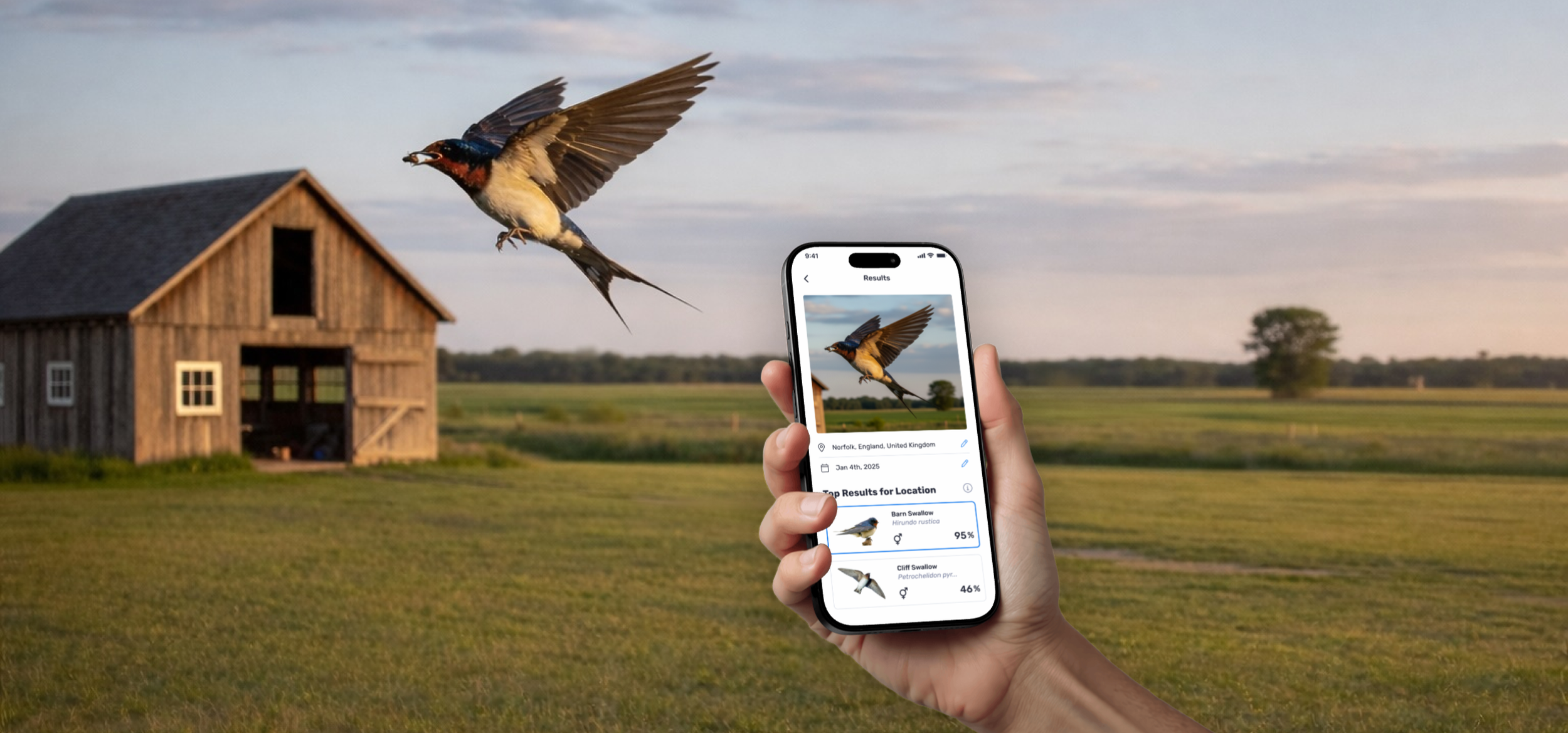
An AI-powered Photo ID experience designed to build trust and user confidence.
Project Summary
Designed the end-to-end UX for a new AI-powered Photo ID feature for Birda, a birdwatching app and community. The feature helped users identify bird species in seconds by reducing uncertainty and clearly communicating confidence levels, supporting learning and helping users build confidence as they identify birds.
Role: Head UX/UI
Platform: iOS app
Focus: Photo ID · Activation · Birda+ value
Photo ID overview
Birda is a birdwatching app that helps users identify birds, log sightings, learn, and connect with a community.
Photo ID is an AI-powered feature that allows users to identify a bird from a photo. Users can take a new photo or upload one they already have, and Birda suggests the most likely species in seconds, even when the image is taken from far away or in less-than-ideal conditions.
The feature was designed to help users quickly understand what bird they are looking at and feel confident enough to log the sighting and continue using the app.
Why we built Photo ID
Birdwatching often happens in imperfect conditions. Birds move quickly, photos are taken from far away, and images are not always clear.
Many users told us they ended up with photos they could not confidently identify. Even when they wanted to log a sighting, uncertainty about the species often stopped them from taking action.
This created a clear friction point in the experience. Users had captured the moment, but lacked the confidence to move forward.
At the same time, AI-powered identification was becoming a standard expectation in nature apps. For Birda, introducing Photo ID was not just about keeping up with the market. It was about helping users understand what bird they were seeing so they could take the next step.
We had been training and improving our Photo ID model over time, and once accuracy and reliability were consistently high, the team felt confident introducing it into the product.
How we built it
Photo ID was a new feature in Birda, and building user trust from day one was essential. As a young product, Birda could not rely on brand familiarity. The experience itself needed to earn that trust.
We knew that if users did not feel confident in the results, they would hesitate to log sightings or stop using the feature altogether. Accuracy mattered, but just as importantly, users needed to understand and trust what the AI was showing them.
For that reason, we focused on designing an experience that felt clear, transparent, and reassuring, while keeping it simple enough to evolve as we learned from real usage.
Early on, we noticed a consistent pattern. Users did not just want an answer. They wanted clarity. They wanted to understand why a species was being suggested and feel confident enough to take the next step.
From the start, we treated Photo ID as an MVP and focused on getting the essentials right:
A fast and simple way to take or upload a photo
Clear results with confidence indicators users could understand
A smooth, low-friction path to logging a sighting
A supportive fallback when users were unsure, including asking the community
These decisions shaped an experience that prioritised confidence and momentum over false certainty.
The Photo ID experience
The core Photo ID journey was designed to feel effortless from start to finish.
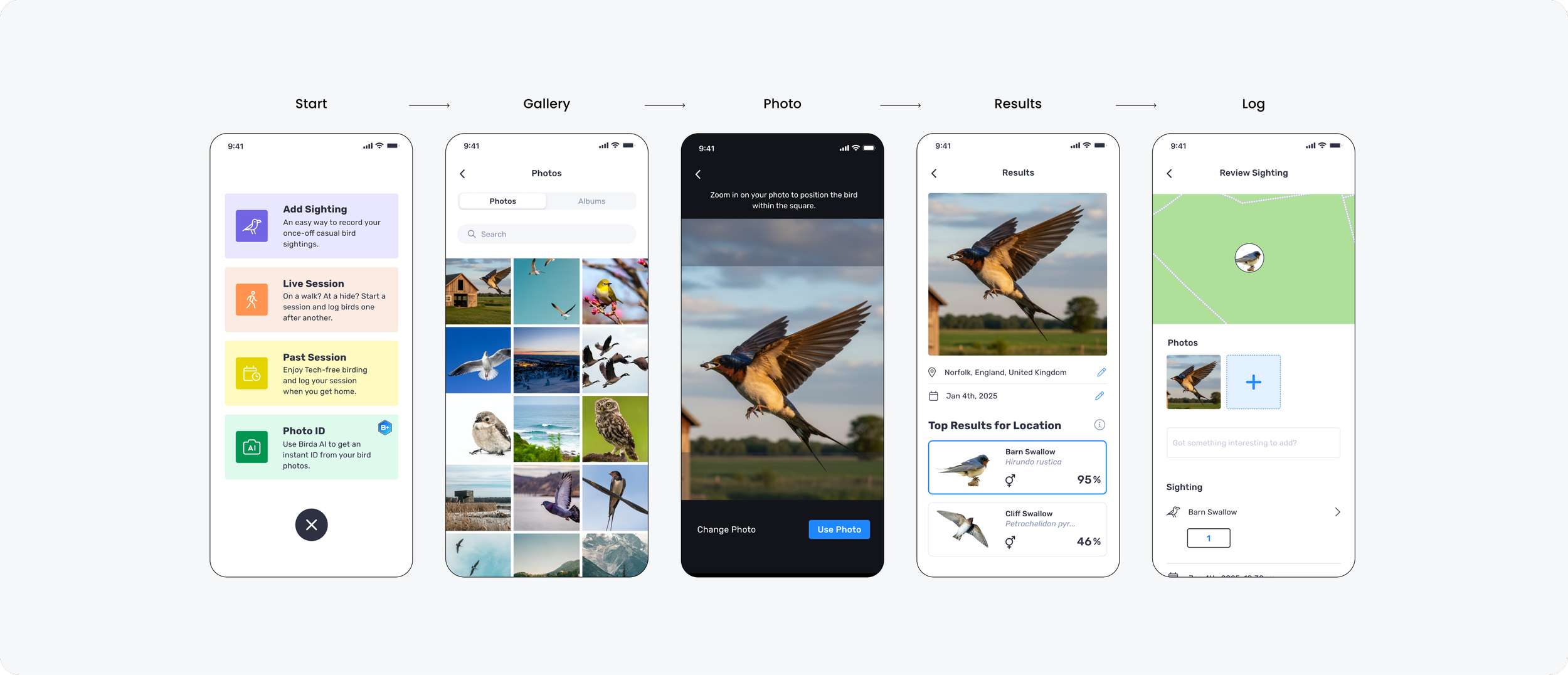
Users could start Photo ID from within the app, choose to take a new photo or select one from their camera roll, and upload it in seconds. The system then analysed the image and returned a shortlist of potential matches.
Rather than forcing a single answer, we focused on helping users feel confident in the result by:
Showing multiple likely species matches
Providing clear, visual options that were easy to compare
Allowing users to correct key details like date and location
Making the next step obvious, so users could log the sighting straight away
And importantly, when the app could not confidently identify the bird, users were never blocked. They could still save the sighting and ask the community for help.
This created a safer, more supportive experience, especially for beginners, because there was always a clear path forward.
Photo ID MVP journey
This is the core Photo ID MVP flow, where users can identify a bird from a photo and log the sighting.
Designing for trust
The Results screen was the most important moment in the experience. It is where curiosity turns into confidence, and where users decide whether they trust Birda enough to take action.
Because Photo ID was new to Birda, we did not treat the result as a single “correct answer”. Birders wanted clarity and reassurance.
Bird photos are often taken quickly, from far away, or in imperfect conditions. That real-world context shaped how we designed the Results experience.
To build trust, we designed the Results screen to feel transparent and easy to act on:
Multiple likely matches instead of forcing one answer
Clear confidence percentages to make the AI feel understandable
Strong visual hierarchy so the next step was always obvious
Editable location and date so the sighting felt accurate and personal
Clear secondary actions, such as Start again and Ask the community, so users never felt stuck
The goal was simple: make the result feel reliable, understandable, and easy to act on.
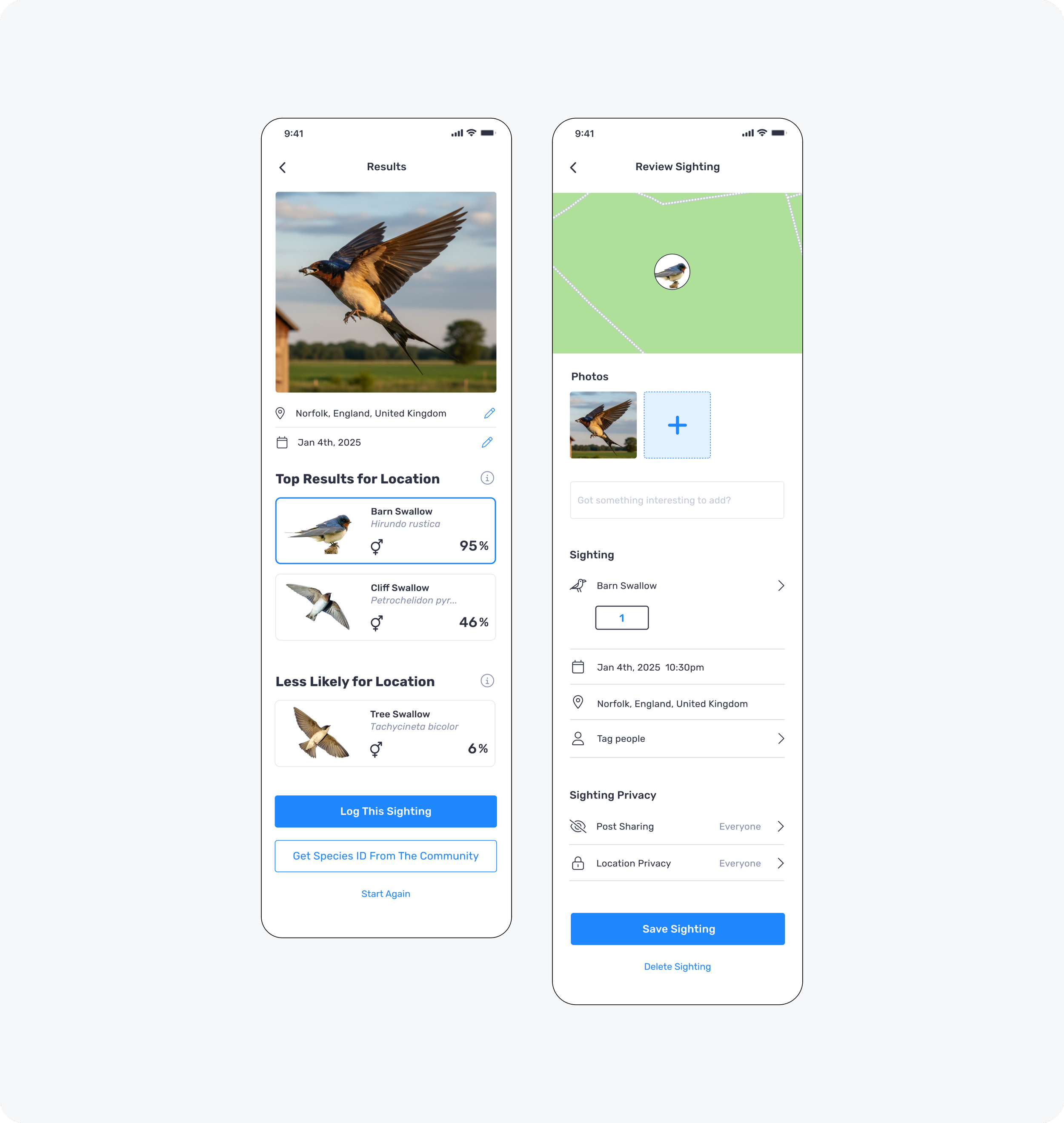
Results and Review screens
MVP rollout and iteration
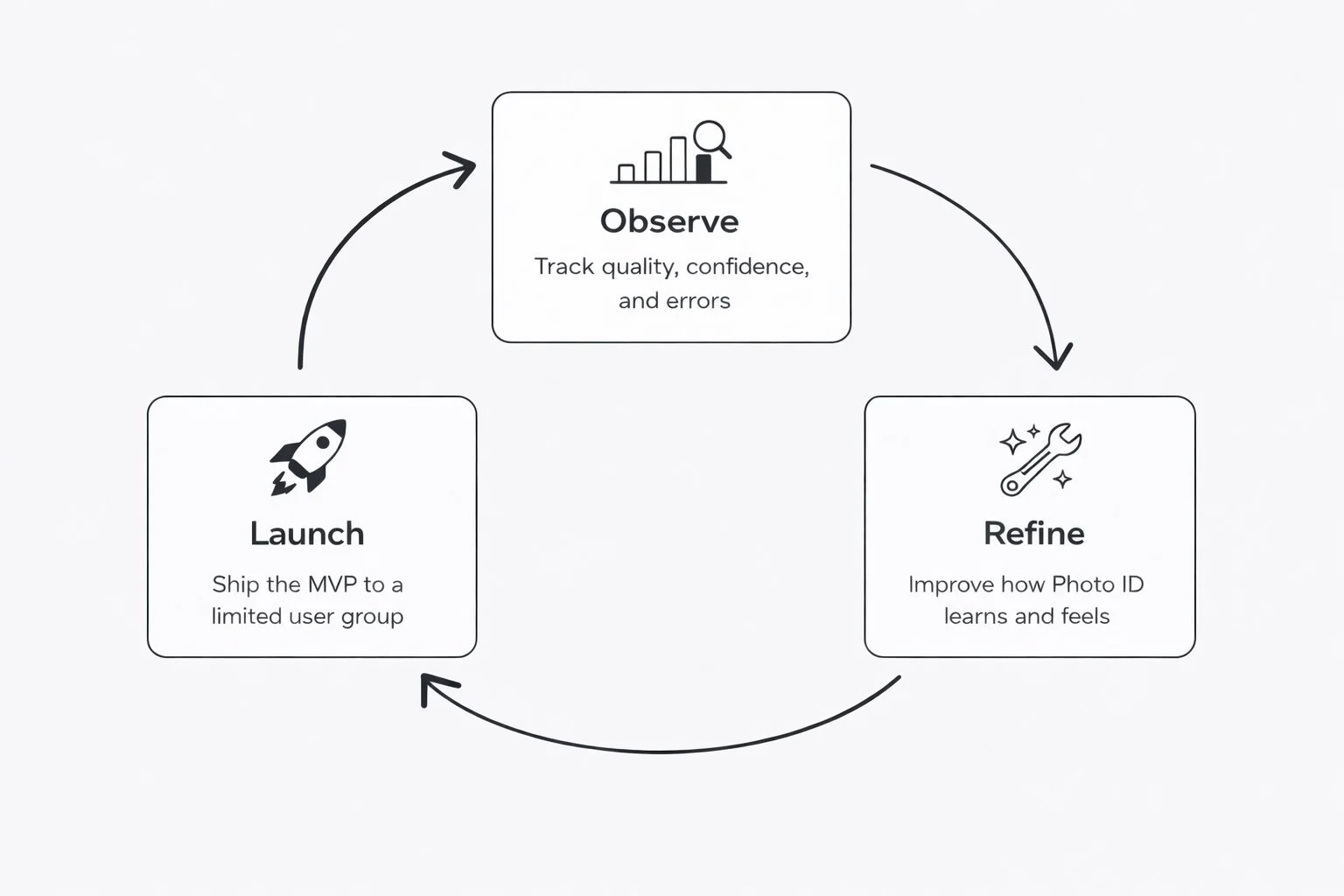
Photo ID was treated as an MVP from the start. Rather than launching it as a fully finished feature, we focused on shipping the essentials, learning quickly from real user behaviour, and iterating with care.
To reduce risk and validate performance safely, we rolled Photo ID out gradually. We started with a small percentage of users, closely monitored usage, confidence, and error patterns, and expanded access over time as reliability and trust increased.
This approach allowed us to move fast without compromising user confidence, which was especially important for an AI-powered feature used in real-world, time-sensitive moments. Each iteration helped us refine both the model and the experience, ensuring Photo ID remained accurate, supportive, and easy to rely on as adoption grew.
Outcome and impact
During testing, users were consistently impressed by the quality of the Photo ID results. Many deliberately tested the feature with very distant, poorly framed, or slightly blurry photos, and were surprised by how accurately the AI was still able to identify the species. This level of performance helped build immediate trust in the feature.
For beginners, Photo ID reduced the hesitation that often comes with not knowing whether a sighting was “correct enough” to log. By providing reassurance and clear next steps, it made it easier for new birders to stay engaged and keep learning.
For experienced birders, it offered speed and reliability. Even in less-than-ideal conditions, users could quickly identify a bird and log the sighting without breaking their flow.
From a product perspective, Photo ID strengthened confidence in Birda’s identification capabilities and created a strong foundation for the next AI-driven features. It also became a key value driver for Birda+, helping users clearly understand the benefit of the product.
Next iteration: Photo ID in onboarding
Once Photo ID proved valuable in the core product, the next step was making it easier for new users to discover it early.
As Birda+ launched, Photo ID became one of the most compelling premium benefits. Rather than relying on users to find it later, we wanted them to experience its value upfront.
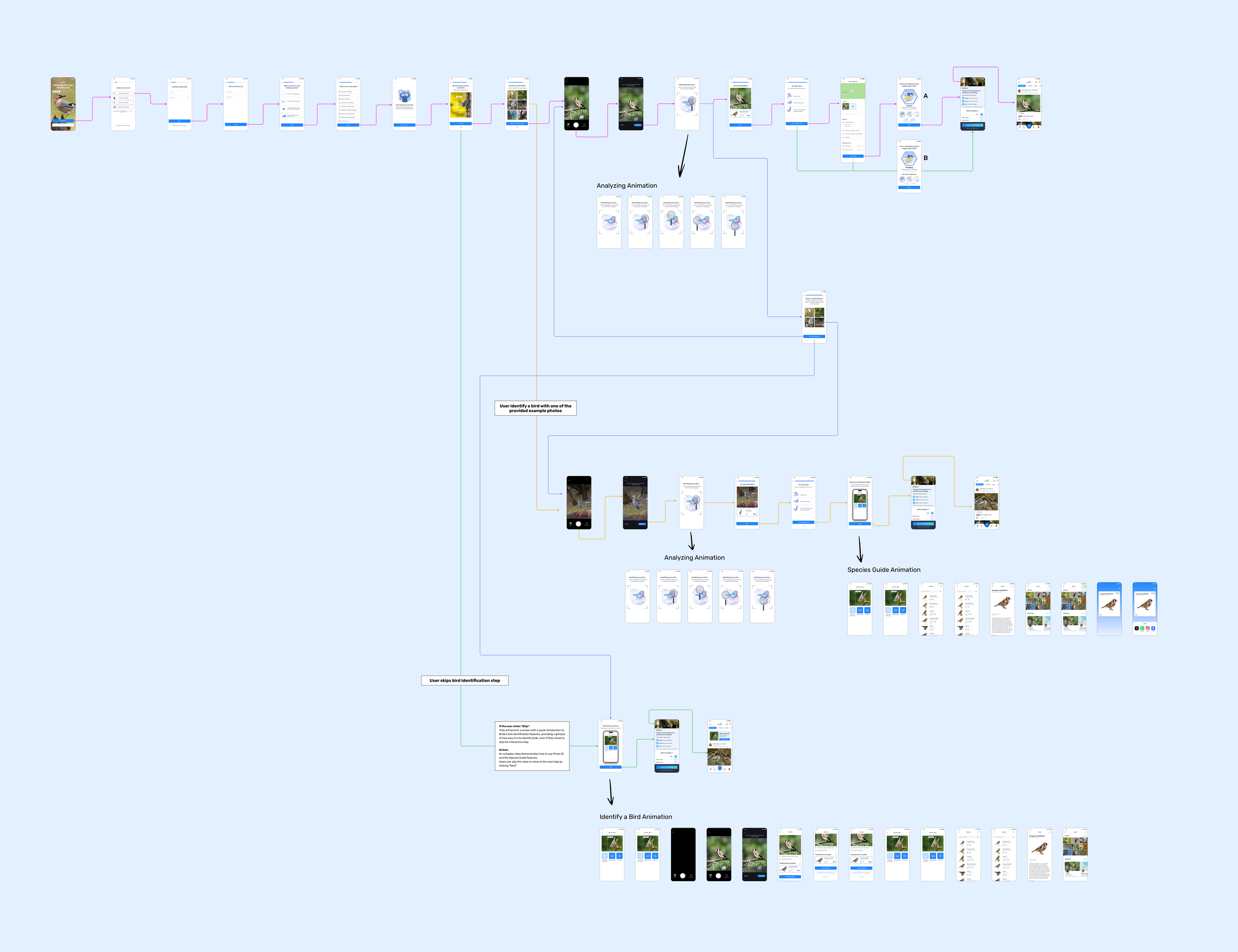
This led us to introduce Photo ID into the interactive onboarding flow.
Instead of explaining the feature through copy alone, we gave new users a hands-on moment where they could identify their first bird during onboarding. This helped them feel immediate progress, build confidence, and understand the product’s value before being asked to commit.
Users could either:
Try Photo ID using one of Birda’s sample images, or
Upload their own photo to test it with something real
This reframed Photo ID as a first-time experience, not just a feature hidden behind navigation.
To make Photo ID truly understandable from day one, the onboarding was designed as a hands-on experience rather than a passive walkthrough.
The flow below shows how new users could actively try Photo ID during onboarding, learning how the feature works by using it.
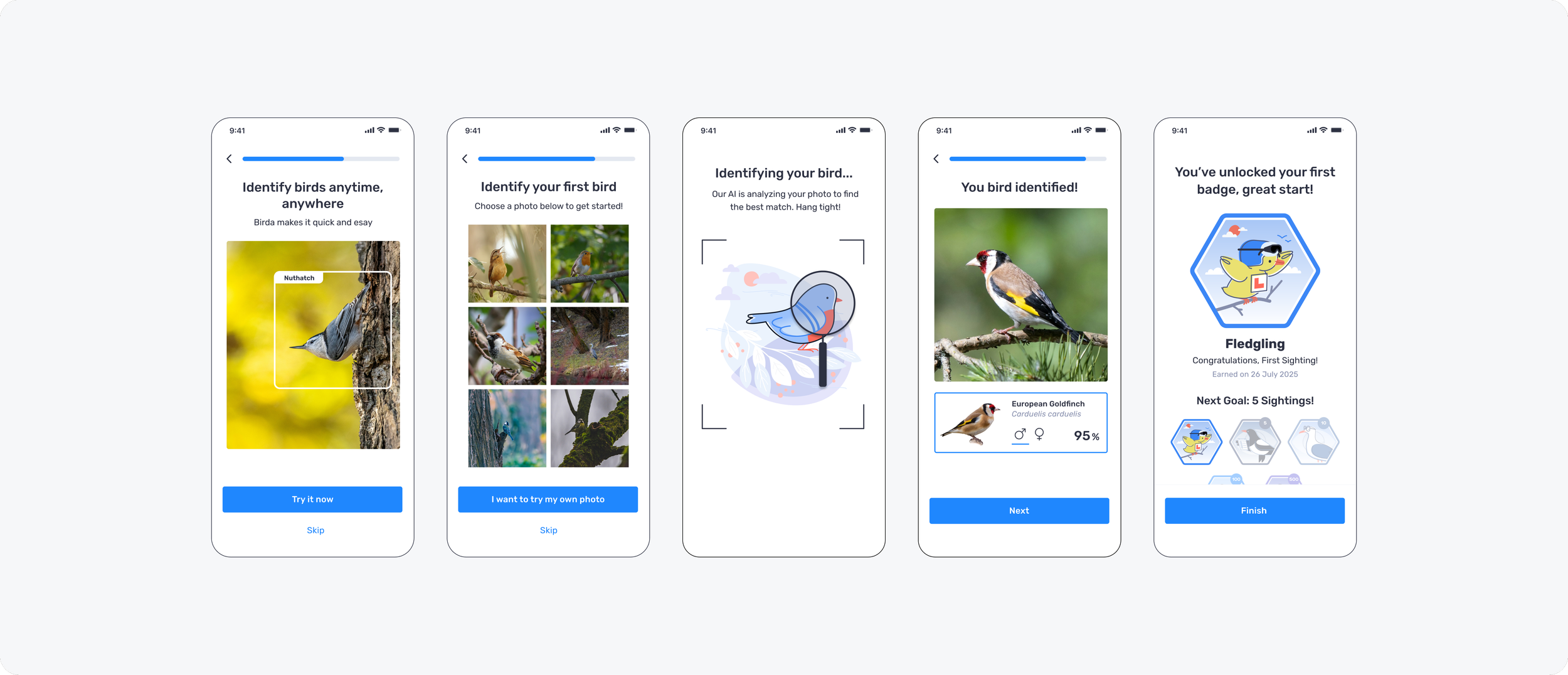
Hands-on onboarding that lets new users try Photo ID and identify their first bird from day one.